> For the complete documentation index, see [llms.txt](https://manuals.dialox.ai/llms.txt). Markdown versions of documentation pages are available by appending `.md` to page URLs; this page is available as [Markdown](https://manuals.dialox.ai/advanced-topics/360dialog/how-do-i-change-my-profile-in-360dialog.md).
# How do I change my profile in 360Dialog
360dialog simplifies the process of editing your WhatsApp business profile. It offers tools for businesses to easily update profile information, such as business name, description, and contact details. With its user-friendly interface, businesses can swiftly make changes to their WhatsApp profile, ensuring accurate and up-to-date information for effective customer engagement.
1. **Login to Your 360dialog Account**: Visit the 360dialog website and log in to your account using your credentials.
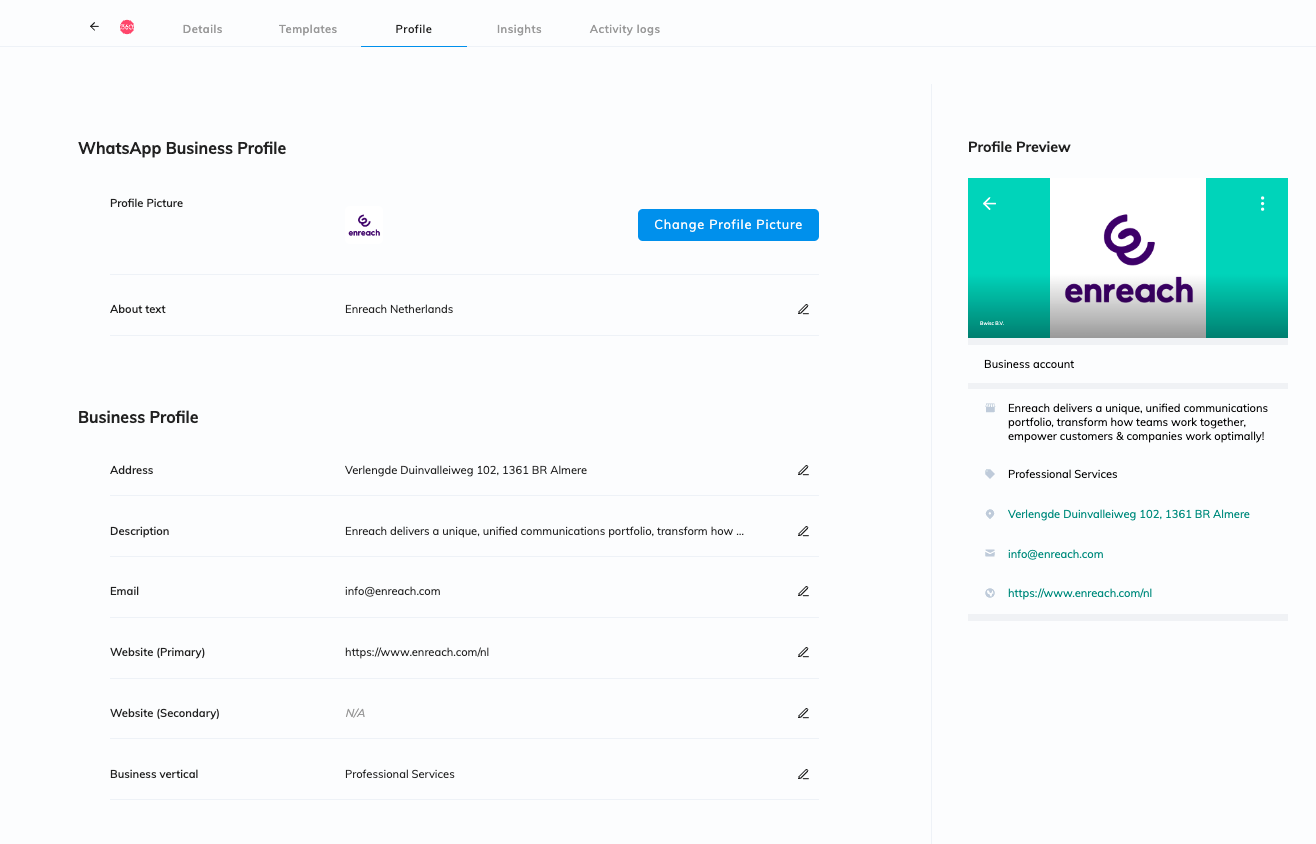
2. **Navigate to Profile Settings**: Once logged in, look for an option or menu item that allows you to manage your profile settings. This might be labeled as "Profile," "Settings," or something similar.
3. **Locate WhatsApp Profile**: Within the profile settings, you should find a section specifically for managing your WhatsApp profile. Click on this section to access the options related to your WhatsApp business profile.
4. **Edit Profile Information**: Within the WhatsApp profile section, you should see fields where you can edit various aspects of your profile. This may include your business name, description, contact information, profile picture, and any other details that are customizable.
5. **Make Changes**: Depending on what you want to update, edit the relevant fields with the new information. For example, if you want to change your profile picture, there should be an option to upload a new image. If you want to update your business description, you can type in the new text.
6. **Save Changes**: After making the desired changes, be sure to save your updated profile information. There should be a "Save" or "Update" button somewhere on the page. Click on this button to apply the changes to your profile.
7. **Review Changes**: Double-check your profile to ensure that the changes were applied correctly. Make any additional adjustments if necessary.
{% hint style="info" %}
**Verify Changes on WhatsApp**: Once you've updated your profile on 360dialog, it may take some time for the changes to reflect on WhatsApp. You can verify that the changes have been successfully applied by checking your WhatsApp business profile from a separate device or asking a friend or colleague to view your profile.
{% endhint %}