> For the complete documentation index, see [llms.txt](https://manuals.dialox.ai/llms.txt). Markdown versions of documentation pages are available by appending `.md` to page URLs; this page is available as [Markdown](https://manuals.dialox.ai/advanced-topics/flow-topics/skipping-step-based-on-language-tag.md).
# Skipping step based on language tag
Example of how to skip a step in the flow based on the current conversation language
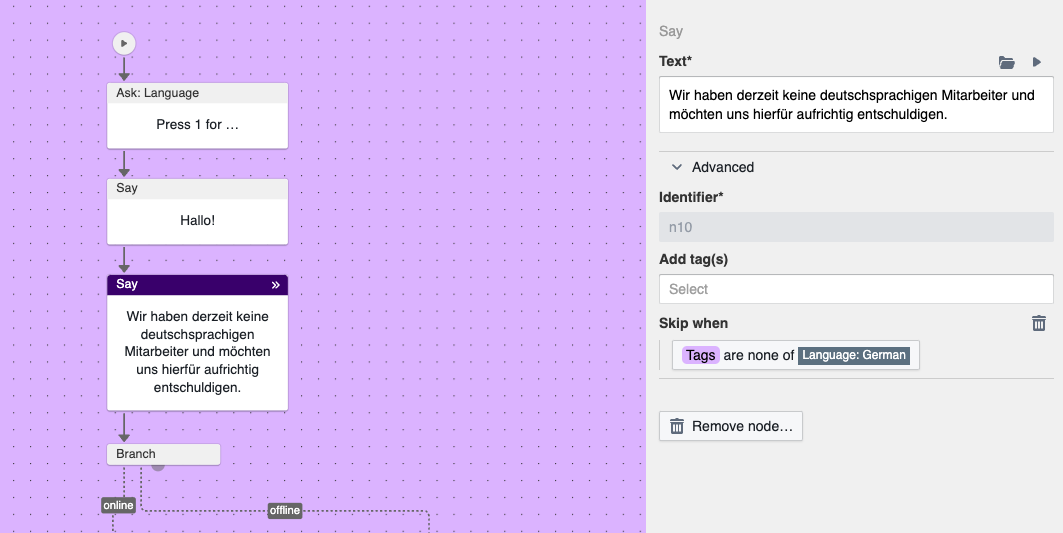
In the following example we use the **Ask: Language** node te ask the user for their preferred language upfront. When the user speaks German, we want to provide an extra notification explaining there are currently no German speaking agents available in the call centers:
Skip logic to skip a step for non-German speaking users
In the side panel of the highlighted **Say** node you'll find under the Advanced tab the **Skip when** field. In here you can configure a condition that evaluates to true when the tag Language: German (`language::de`) is not set.
Example condition
When running this flow you'll see that the message only appears when the user selects German as their preferred language.