> For the complete documentation index, see [llms.txt](https://manuals.dialox.ai/llms.txt). Markdown versions of documentation pages are available by appending `.md` to page URLs; this page is available as [Markdown](https://manuals.dialox.ai/advanced-topics/make.md).
# Make
How to integrate with Make
## What is Make.com
Make.com is a powerful automation platform that allows users to connect different apps and services to automate workflows without coding.
**What Make.com Does:**
* Creates automated workflows called "scenarios" that connect multiple apps and services
* Transfers and transforms data between different platforms
* Executes tasks based on triggers or schedules
* Processes data through a visual interface with modules and connections
**Use Cases with DialoX:**
* Keep your CRM system in sync with updates via bots
* Create tickets based from phone calls or chat conversations
* Process forms and survey responses
* Send WhatsApp broadcast based on events in external systems
Make.com operates on a freemium model with paid plans offering more operations, data transfer, and advanced features for businesses of all sizes.
## Setting up the Make integration
#### Enable REST API Channel
Go to the Channels page of your bot and enable the REST API channel.
On the Settings tab of the REST API channel, you will be shown both the Bot ID and the Authorization token. \
\
Make needs both to be able to connect to your bot.
#### Create a scenario
In Make, go to Scenarios and create a new Scenario
#### Add DialoX trigger
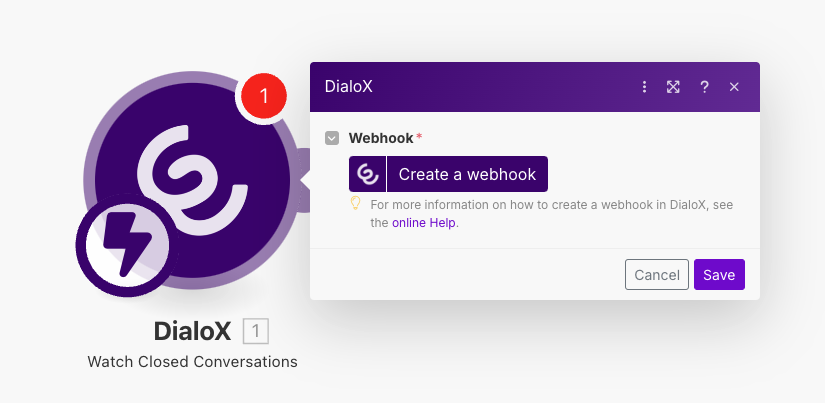
Add a new module to your scenario, look for the Watch Closed Conversations module in the DialoX app directory.
Click on the Create a webhook button, provide a name for the webhook, e.g. "Closed conversations webhook" and create a Connection with the API key and Bot ID we got on our REST API channel page.
Hit Save three times and you now have successfully set up your first DialoX trigger in Make.
## Make modules
### Actions
The Make integration offers two Action modules to retrieve data from the DialoX platform:
* Get a Bot
* Get a User
Besides retrieving data, there are three Action modules to send data:
* Send a Conversation Event
* Send a Whatsapp Broadcast
* Update User
### Triggers
There are three instant triggers available in Make to act upon. Each listens to a seperate entity in DialoX:
* Conversations
* Notes
* Tags
#### Watch Closed Conversations
The "Watch Closed Conversations" trigger alerts you to any conversation that has been concluded, enabling you to track and review finalized interactions.
#### Watch New Notes
The "Watch New Notes" trigger notifies you when a new note is added to a conversation, ensuring you're updated with the latest input or changes.
#### Watch Conversation Tags
The "Watch Conversation Tags" trigger allows you to stay informed about any tag updates, helping you categorize and prioritize conversations efficiently.
### Universal API call
If you want to implement any other API which is currently not implemented as an Action or Search module in Make, you can use the Universal API call to make any API call to our REST API.
Details of the available APIs can be found on the [Developer docs](https://developer.dialox.ai/dev/rest/).