> For the complete documentation index, see [llms.txt](https://manuals.dialox.ai/llms.txt). Markdown versions of documentation pages are available by appending `.md` to page URLs; this page is available as [Markdown](https://manuals.dialox.ai/advanced-topics/meta/how-to-connect-facebook-page-to-facebook-business-account.md).
# How to connect Facebook page to Facebook Business Account
How to connect the company page to your new Facebook Business account
If you have an up and running Facebook page for your company, and just made a Facebook Business account, you will want to connect them together so you can manage everything at once.
To connect your Facebook page to your Facebook business account, follow the steps.
* Log into your Facebook Business account via
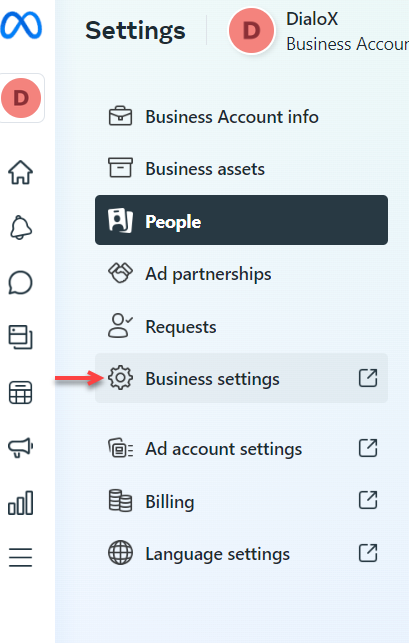
* At the top left corner under Meta Business Suite, you can open your Business account.
* In the blue bar you can go to Business settings.
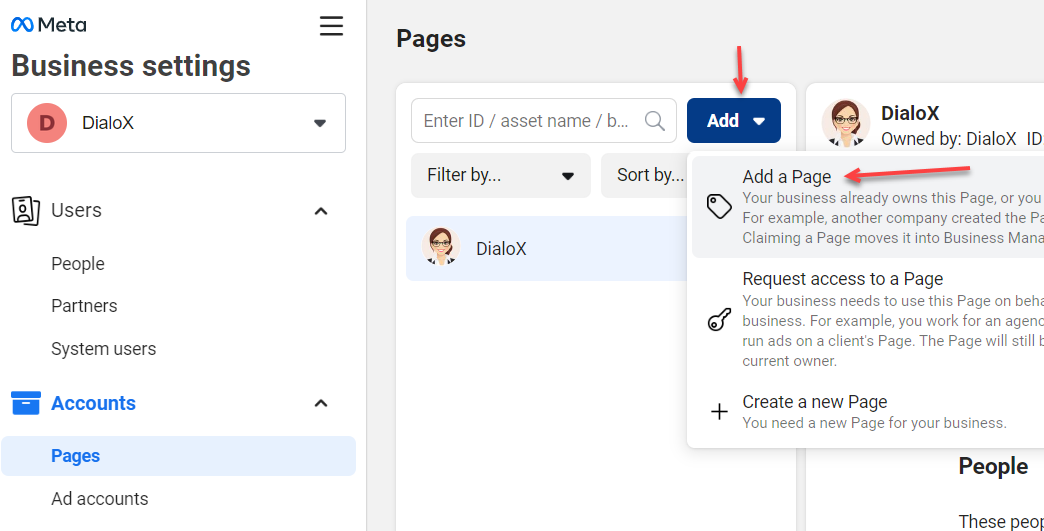
* Select 'Pages' in the left bar.
* Click on 'Add' and 'Add a Page'. Here you can find your already existing Facebook page.
Now your existing page is connected to your Facebook Business account. This way you will not have to edit and update multiple pages.