> For the complete documentation index, see [llms.txt](https://manuals.dialox.ai/llms.txt). Markdown versions of documentation pages are available by appending `.md` to page URLs; this page is available as [Markdown](https://manuals.dialox.ai/studio/flows/nodes/lookup-extension.md).
# Lookup: Extension
{% hint style="info" %}
Only operational in beta for Enreach Contact environments
{% endhint %}
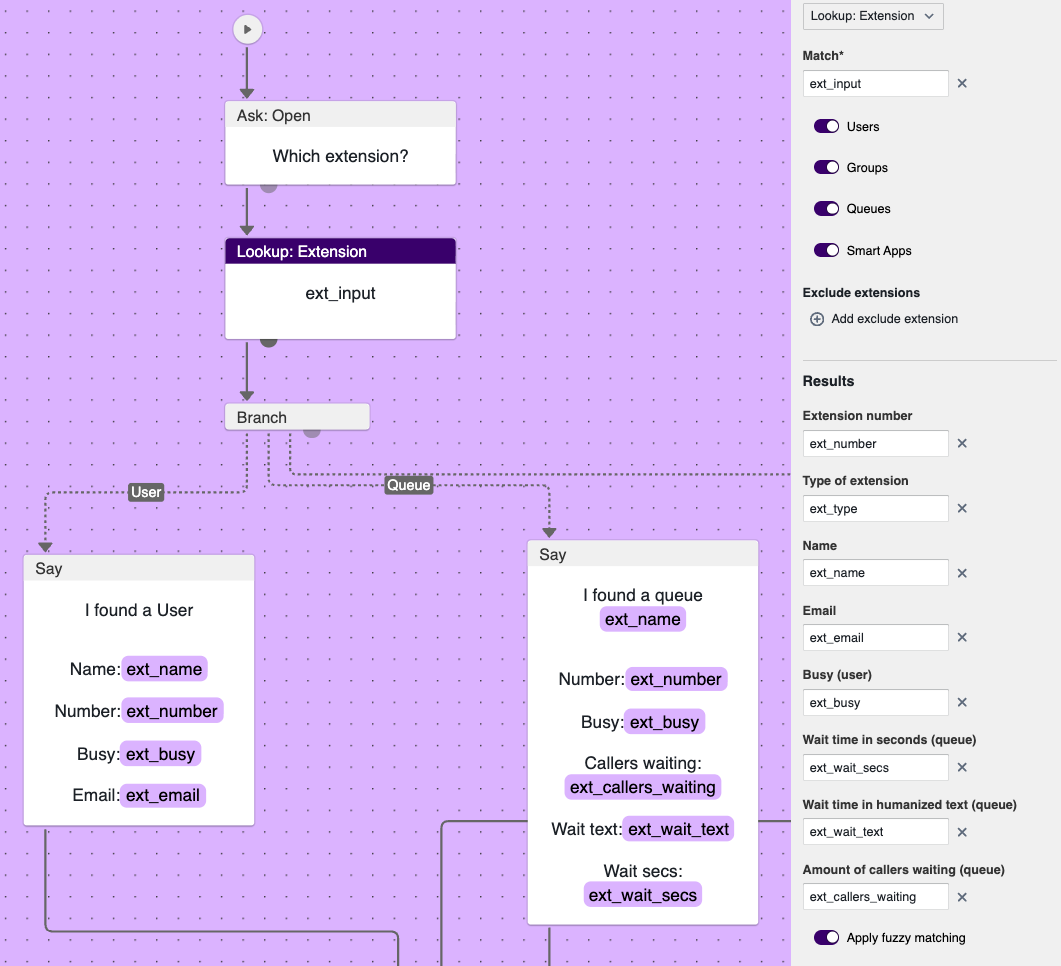
The Lookup Extension node doesn't have a direct user visible output. Instead it can be used to lookup details on an extension and store that into [custom variables](/studio/flows/variables.md). It can be used to find an extension by name. This can be a user extension, a queue, a group or even a Smart App. Depending on which type of extension is found, different details might be available. For instance, a queue would expose it's amount of callers in the queue and the expected wait time, while for a user this doesn't make sense.
As you can see in the example above it is possible to use this node to lookup the extension details and then make your flow depend on it. The branch in the above example allows the flow to switch based on the type of extension. To make one of the branches, like the first one on the left, to branch based on the extension being a User Extension, the following condition can be configured:
The following extension types can be configured:
* User
* Queue
* Group
* SmartApp
{% hint style="info" %}
When configuring the conditions as presented above, make sure to match the exact same extension type names, including the first capitals. So "User" and not "user".
{% endhint %}
As you see in the Flow Node fields you need to specify which data you want to store in which variable. This requires you to create these variables yourself beforehand. See the [section about variables](/studio/flows/variables.md) on this topic to learn how.
You could also offer a flow like this, to let users know about the wait time of a queue and then ask them to wait or not. In the case of a no you could redirect users to a "leave a note" flow.
Alternatively you could configure a branch node that checks the waiting time. When waiting time is more than 5 minutes you could direct the user immediately to the "leave a note" form without even asking.
{% hint style="info" %}
You see variables being used in the above examples like `ext_number` , `ext_name` and `ext_wait_secs` . Please note that those are arbitrarily chosen variable names. You can name them any way you like when creating these variables.
{% endhint %}
### Node properties
| Property | Description | Explanation |
| ---------------------------- | --------------------------------------------------------------------- | ----------------------------------------------------------------------------------------------------------------------------------------------------------------- |
| Match | Variable to match in the table | In which variable did you capture the name or number to look for in this account's extensions? |
| Users | Including user extensions | Toggle when you want the user extensions to be included in the search |
| Groups | Including group extensions | Toggle when you want group extensions to be included in the search. |
| Smart apps | Including smartapp extensions | Toggle when you want smartapp extensions to be included in the search |
| Exclude extensions | A list of extensions to NOT include in the search | When certain extensions are not allowed to be included in the search, like when you want certain employees not be able to be found by a smart app. |
| Results | | |
| Extension number | The extension number found | |
| Type of extension | The type of extension that was found | User, Group, Queue or SmartApp |
| Name | The name configured for this extension | Like the name of the user or name of the queue |
| Email | the email address configured for the Enreach Contact web user. | If no e-mail address is configured for the web user, the operator user name will be used. |
| Busy (user) | The presence of the user | This is a boolean (true or false) result, so make sure to create a variable of the boolean type |
| Wait time in seconds (queue) | The wait time in seconds for the queue | This is a numeric value, so make sure to create a variable of the number type |
| Wait time in humanized text | The wait time in human readable text | This is a text value that translates the wait time in seconds to something more friendly, like "2 minutes" |
| Amount of callers waiting | The amount of callers waiting already in the queue (before your turn) | This is a numeric value, so make sure to create a variable of the number type |
| Apply fuzzy matching | Exact or fuzzy match | Whether the best possible match, or the exact match should be returned. Note that exact match is really exact match, including capitals or lower case characters. |